
About This Game
Core Concept
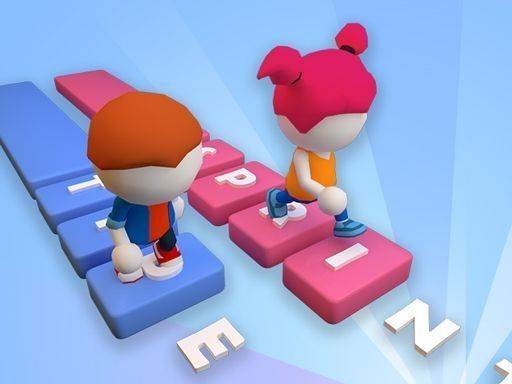
Word Dash: Typing Challenge merges traditional typing exercises with a competitive racing format. Players see a word displayed on screen and must type it accurately. Each correct keystroke constructs a section of track directly in front of their character. Once a word is completed, the runner automatically dashes across the newly formed path. A fresh word then appears, continuing the cycle until the race concludes. This design transforms repetitive typing drills into an active, goal-oriented activity where progress is visible and immediate.
Race Dynamics
Races in Word Dash: Typing Challenge involve multiple computer-controlled opponents, each advancing at a pace determined by their own typing speed. The objective is to be among the first three runners to finish. This structure encourages players to balance speed with accuracy, as mistakes can slow momentum. The game provides clear on-screen prompts that guide users through each step, ensuring even newcomers understand the flow. The competitive element adds motivation without creating overwhelming pressure, making each race feel like a friendly challenge.
Visual and Audio Presentation
The game features simple 3D characters and environments that keep the focus on the typing action. Visual cues clearly indicate which word to type and how much of the current platform remains. The interface is uncluttered, with essential information displayed prominently. Sound effects provide gentle feedback for correct and incorrect keystrokes, reinforcing learning without distraction. The overall aesthetic is clean and inviting, suitable for players of all ages and skill levels.
Skill Development Approach
Word Dash: Typing Challenge is designed as a tool for improving typing proficiency through consistent practice. The game may include various word sets that gradually increase in complexity, helping users build familiarity with common letter combinations and keyboard layouts. By focusing on typing entire words rather than individual letters, players develop muscle memory and fluidity. The racing format encourages regular repetition, which is key to building speed. This approach makes the game equally useful for beginners learning the keyboard and experienced typists looking to refine their technique.
Accessibility and Platform Support
The controls are straightforward, requiring only the keyboard for input. This simplicity makes the game accessible on both PC and mobile devices with physical keyboards. The interface adapts to different screen sizes, ensuring a consistent experience. No complex menus or configurations are needed, allowing players to jump into a race quickly. The family-friendly environment means there are no inappropriate themes or content, making it a safe choice for children and adults alike.





Comments
0 comments